XLST and you
2025 December 27 // 2025, guideHere's the compaion piece to my RSS guide blogpost (which I cleaned up!)
More RSS
I'm RSSpilled I'm RSScore I hate it it drives me insane it's the greatest thing we have on the internet and you can pry it from my hands.
As much as I am pro-make your own website... Especially as artists used to socmedia... It is a hurdle to share your work from your site. It's a different system, it's cumbersome if you're not used to it (and if you don't have a pc... you're locked out.), it's very difficult to learn a whole new skill and be more pro-active in the small web scene.
On my homepage, you can see I now have a feed which shows off my art rss. I recently went on eunoia's website and I went to the feeds page and.... Huh... why am I able to see this rss xml file? How is this possible??? I'm supposed to be seeing some painful wall of text!? What is this???
It's time to discover the wonderful world of xslt... Don't worry, we can do this together.
PLEASE NOTE: You require a host that lets you use xslt as a file type. So, basically... if you're using a free neocities, you won't be able to use this. If you're on Neoweb or another host, you're good to go. I have other options down below.
ANOTHER NOTE: I am not good at coding. I am guessing, googling and hitting ctrl+u. If you're smarter than me and see I'm saying something completely wrong-PLEASE let me know!
XSLT
XSLT is a filetype that lets you take data from an xml file and presents it in an easy to read format on a webpage.
Sounds good, yeah?
Think of how you need CSS to present HTML in whatever way you wish. XSLT is tricky, but it serves the same function.
- The first thing we're going to do, is follow this blog post by cassidoo, and use her xsl template.
- You're going to copy the github text, make a new file on whatever text editor you like and paste it in.
- You're going to save this file as a .xsl file.
- Then in your xml (your rss) file, you add the following:
<?xml-stylesheet type="text/xml" href="LINK/TO/XSL/FILE">
And you should be good to go!
Cassidoo does a great job of explaining, and it's fairly easy to follow along. I'm not going to add anything because I'm outta my depth.
Displaying Images
This is what took my the longest time to figure out. XSLT should be able to display images if I just give it the right set of instructions. This is a hack job. I'm not doing this right, but it works.
- Add the css to the xsl
img {
width:80%;
height:100%;
margin-top: 0;
margin: auto;
display: block;
}
- Add the following to the end of your xsl file, in the body text like so:
<a target="_blank">
<xsl:attribute name="href">
<xsl:value-of select="link"/>
</xsl:attribute>
<img src="{guid}"/>
</a>
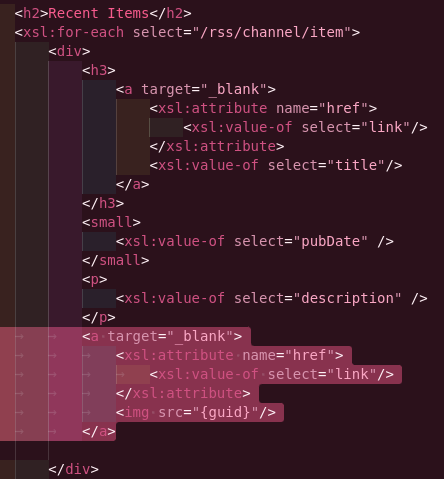
We're using the guid rss element to create a clickable image link. It's a bit of a hack, but it's the only way I got it to work.
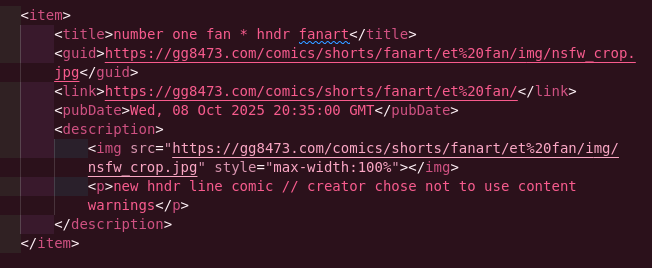
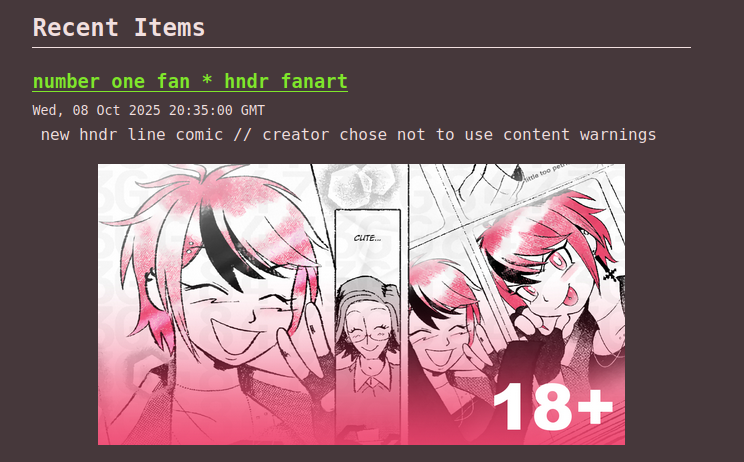
This is how to set it up on your rss. I highly recommend making small thumbnail images for this.
Caveats: It's cumbersome, but since I'm not doing this all the time it's okay. Once it's set up, it's set up. Also, use pngs/jpegs. A lot of feedreaders (or just the ones I'm using) dont accept webps o)-( there's always something!
End notes
I think a lot about the future of the internet, and how to future proof my work the best I can. Seeing what's gone down on twitter... Seeing people going Oh! Just use gifs! The ai can't read gifs! Is that how you want to live? Is that really how you wanna live?
Listen, don't go doing all that. It's not worth it for a socmedia site that'll pull the plug anyday now. Put that effort somewhere else.
I'm off to finish the Christmas goodies, hope you're having a good one.
--xoxo becky